

You’ve probably heard that with skill one can play even using the worst peripherals in the world. And while that may be true in some cases, a quality mouse will elevate your gaming experience and performance for as little as under $100.
While there are more expensive mice, there is no real need for one. The market is full with a variety of budget friendly gaming mice of all kinds.
Which is why we present you some of the best gaming mice you can find in the price range for up to $100. There are cheap and quality mice, lightweight, wireless, competitive and more.
SteelSeries Rival 3

Starting with the most classic of all mice is the SteelSeries Rival 3. If you are not looking for a fancy or wireless mouse and just want a simple, reliable gaming mouse from an equally reliable brand, scroll no further.
The design of Rival 3 is the most simple ergonomic design of the gaming mouse with clean and solid surfaces and weighing 77 grams. The cable and the feet of the mouse are both on the basic side. The cable is noticeable when using but not enough to disrupt your gaming session and the gliding is smooth enough to flick to your heart’s content.
Features of Rival 3 are quite limited, there are 6 programmable buttons, a sensor for up to 8500 CPI, and RGB lighting that you can customize through the official SteelSeries software.
All in all, for a gaming mouse on a budget, the Rival 3 is the very first one you should check out. There’s also a wireless version of the mouse for an extra $20 or a newer Rival 5 model for an extra $30 if you want something on the fancy side.
Razer DeathAdder Essential

Very similar to the Rival 3, the DeathAdder Essential is another basic and budget gaming mouse gaming mouse. Just this time from Razer.
The design of this mouse is more ergonomic and curvy when compared to the Rival 3. DeathAdder also has a rubber grib for your right thimb to lay on for extra stability and control.
It does have 5 buttons instead of 6. All of which are programmable and remappable with macro functions if you choose to do so. And the optical sensor allows you to increase your sensitivity up to 6,400 DPI.
There’s nothing much else to say about Razer DeathAdder Essential other than it is a solid gaming mouse way under $100 and will be great for you if you are looking for a more ergonomic design.
Logitech G502 HERO

The G502 HERO is a classic gaming mouse with tons of buttons and features. It may be on the older side, but it is a reliable pick for an under $100 gaming mouse.
When looking at the design you can instantly tell that it’s first of all, a gmaing mouse. There are 11 programmable buttons that you can assign custom commands to and store in presets to change on the fly.
Moving on there’s a textured rubber grip for improved control and the scrolling wheel tilts both ways for increased input.
The Hero sensor allows for whopping 25,600 DPI and 1:1 tracking which is always a good thing for gaming. Although you may not get even close to using high DPI settings, the Hero sensor is still a very reliable thing.
There are also modular weights underneath the mouse that will allow you to add up to extra 18 grams. Although the G502 is already on the heavier side weighing 121 grams.
And as for RGB, there’s a dedicated software for you to customize your lighting and sync it with other Logitech devices just like you would on any other device.
Razer Viper Mini
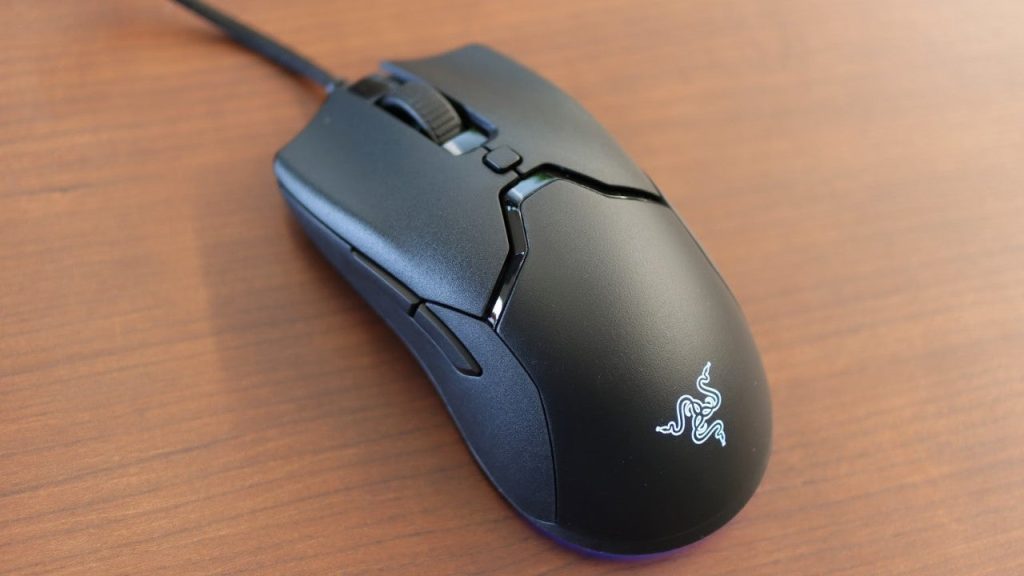
On a more premium yet affordable side, there’s Razer Viper Mini. You may know Razer Viper and Razer Viper Ultimate both of which are on the expensive side. Well, Razer Viper Mini packs all the best from both for half a price.
The overall build is 10% smaller since it’s a mini version but it is still quite comfortable if you are using a claw grip. For bigger hands and palm grips we’d recommend Razer Viper, which is $79.99 but at least you will have a comfortable grip.
Viper Mini is also quite light, weighing only 61 grams while the design is almost the same. It has all the visual distinctions of Viper including the PTFE feet for the best gliding experience.
A few additions to the design id the DPI button in the middle, the loss of the buttons on the right side of the mouse, making it less usable if you are using your left hand for it, and extra RGB underneath the mouse.
The rest of the features are all you’d expect from a Razer mouse. Chroma RGB support with tons of customization, up to 8,500 DPI possible settings, and 6 programmable buttons with macro functions.
SteelSeries Rival 600

SteelSeries Rival 600 will be your best gaming mouse under $100 if you play competitive games and prefer to take full control of your device.
The design is not as sleek as let’s say the Rival 3 but it provides the most optimal support for your palm. It also has silicon side grips for increased comfort and control.
The mouse has 4 modular weights on each sides of the mouse so you can adjust the weight to fit you perfectly wit ha 129 grams being the maximum possible weight.
Sensor here is a custom by SteelSeries called True Move 3 that allows for up to 12,000 CPI, 350 ips speed and 1 to 1 tracking which is very accurate and is perfect for esports games.
But what makes this mouse so special is the second lift-off sensor. What it does is it gives more control and stable mouse movements when you lift up your mouse to move it over. It is paired with configured gravity center to make the lift-off easier. Especially useful when playing competitive FPS games like Valorant on a low sensitivity.
The rest is default. Customizable RGB lights and 7 programmable buttons as you get three of them on the left side of the mouse to control with your thumb.
Glorious Gaming Mouse – Glorious Model D

The Glorious gaming mice are actually quite well known within the market. They released the Model O back in the day, which was good. The next one was the Model D which is a more ergonomic gaming mouse.
It’s a honeycomb design mouse that you can get in matte and glossy finished. With glossy being $7-8 more. The design allows the mouse to stay as light as 69 grams.
It has the PTFE Glorious Skates feet that offer the smoothest gliding you can potentially find on the most. You will also get a few extra feet panels to put on your mouse if you want to extend that feel.
The mouse features Glorious Ascend cable which is probably one of the best stock cables out there. Although the mouse is wired you will barely notice it making it feel as if it is wireless.
The features are quite basic. 6 customizable buttons with macro support, 6-step DPI, polling rate, and RGB that is compatible with Razer and Logitech keyboards.
If you are a fan of lighter and smaller gaming mice, you might want to check out the Glorious Model D-. Which is the same as the regular D, just smaller and lighter all for the same price.
SteelSeries Aerox 3 Wireless

One of the best lightweight wireless gaming mice just one cent below a 100 is the SteelSeries Aerox 3 Wireless.
The shape and feel of Aerox 3 comes directly from the Rival 3 we mentioned above. Only this time you are greeted with a honeycomb design made to lose as much weight as possible from the top and the bottom of the mouse.
The feet for the mouse are PTFE, which are what we’ve mentioned in other products, for the best gliding and smooth control of the mouse.
As for the features, you got your customizable RGB, a custom sensor for up to 18,000 CPI, 200 hour battery life, and Quantum 2.0 Wireless for your 2.4 GHz connection. Although it supports Bluetooth 5.0 as well. Finally it is water and dirt resistant to protect the mouse while it has lots of holes in the shell.
It is a wireless mouse which is why it’s on the expensive side. However, there is a wired alternative which is $40 less than the wireless. Although we’d argue that the USB-C cable that is used with it may not always be comfortable to use.
Cooler Master MM-710

On the note of lightweight mice we’ll wrap up with the Cooler Master MM-710. And yes, Cooler Master make peripherals, quite good ones as well.
The MM-710 is probably one fo the best wired lightweight gaming mice you can find. But that comes at a cost of a heavy honeycomb shell. The majority of the mouse is made of holes to lose weight. While it may look cool for some, this design is not for everyone.
Just like Aerox 3, this mouse is water repellant in case water spills on it and you are afraid it will fry the mouse through the honeycombs.
The rest of the mouse is pretty standard. There are 7 levels of DPI from 400 to 16000 and the 400 ips tracking speed. Unfortunately there is no RGB lighting which is another trade off for the light weight of the mouse.
