

Keyboards are one of those peripherals that you don’t get much choice when it comes to size. So if you have small hands it can be annoying to find the right one. This is why here’s a list of the best gaming keyboards that will be perfect for small hands.
Now, you won’t find keyboards dedicated to small hands, but some will fit you better than others. That’s primarily due to their overall size, key size, and spacing between them. All of that will help you navigate through your keyboard much easier.
Down below we made a list of some of the best gaming keyboards suitable for small hands based on the characteristics mentioned above. You will find their features, pros and cons, and what can you expect should you choose to buy one.
Most of them are mini or 60% size keyboards which are both comfortable and compact.
HyperX Alloy Origins 60

Starting off HyperX Alloy Origins 60 is one of the best all-around keyboards out there. You get all you need from a smaller keyboard that will be quite comfortable for small hands and perfect for gaming.
The build is full aluminum, PBT keycaps, and the overall design is very slim, with tight keys and no space wasted. The base of the board is a bit more round than you’d normally see on a keyboard. But looks great.
In a box, you will also get 2 extra keycaps: a spacebar with a nice topo pattern and the escape button with a Hyper X logo.
As for switches, there is a choice between HyperX Red (Linear), Aqua (Tactile), and Blue (Clicky). All of these are HyperX custom switches that are not hot-swappable. And it can be a bit of a pain to get your hands on extra switches if you will need any as we wouldn’t recommend mixing the HyperX switches with something like CherryMX.
The HyperX keyboards come with their own software, HyperX NGENUITY, which will be required for you to reprogram function keys and set up the RGB lighting effects. The capabilities of the app are quite limited with only 10 RGB effects and three key profiles. And the app is exclusive to Microsoft Store though.
Keychron K2 Wireless

A bit of an odd one out on the list is Keychron K2 Wireless. This keyboard doesn’t immediately strike as a “gaming” keyboard but hear us out. If you haven’t heard of Keychron at all, these guys specialize in all sorts of custom keyboards. They are all credibly well-made and some of them have tons of customization options.
The Keychron K2 is a staple keyboard from them. It’s minimal, great for work, and also even greater for games. It is a 75% layout, so it does have a few extra keys compared to something like Alloy Origins 60, but the keys are all very tight and slim and so is the outside frame of the keyboard.
The keyboard comes in three options: standard ($79.99), hot-swappable ($89.99), and non-backlight ($79.99). The stock backlight is white, however, if you want an RGB light, it will cost you an extra ten dollars. All of the keyboard variants are Bluetooth wireless (no 2.4 GHz unfortunately) but for gaming, you can freely use the USB-C cable to plug the keyboard into your PC.
The switches in there are Gateron Red, Blue, or Brown and those are overall good mechanical switches. In a hot-swappable version, your only option will be the Gateron G Pro Mechanical which is actually hot-swappable. Keep that in mind if switches are important to you.
All in all, the Keychron K2 Wireless is a great keyboard for both work and games for a price cheaper than keyboards from gaming brands like Razer. There are quite a few more and newer versions of this keyboard among others available from Keycrhon. So, make sure to browse around and see what you like most. But if you end up confused, you can always go for the K2 option.
Razer Huntsman Mini

Next in the line is Razer with their own 60% gaming keyboard. The Razer Huntsman mini is a slim and quality built keyboard for gaming. The design is as compact as it can get without any sacrifices making it a very good keyboard to use for gaming if you have small hands.
The build feels premium, it’s Razer after all, yet minimal being very fitting for minimalistic setups. There are no extra details, just your simply designed keys, a glossing Razer logo at the bottom, and good-looking “By Gamers, For Gamers” engravings on the backplate.
It comes in two color versions, black and white, in case you want it to fit your setup perfectly. Or to make it fit even more you can try out some of the Razer PBT keycaps that come in 4 colors: green, white, black, and quartz.
The keyboard comes with three switch options: analog, linear, and clicky. Although it’s a matter of preference, Razer’s linear optical switches are responsive and quiet so if don’t know which ones to go with, go for linear. Do note though that the switches on this keyboard are not hot-swappable.
The rest of the board is pretty default. You got a dedicated software, Razer Synapse, to program RGB and keys. And all your function keys across the board.
All in all a great choice if you are looking for a simple yet quality keyboard.
ASUS ROG Falchion 65% Wireless

The ASUS ROG Falchion 65% is one of the few worthy wireless small keyboards made for gaming. It is a bit on the expensive side but packs a few cool features you won’t find anywhere else.
The design of the Falchion speaks “gaming” with the aggressive font, “Republic of Gamers” written on the spacebar, and the ASUS logo on the escape key. It will greatly complement your gaming station but not so much if you try to keep it clean and professional.
Some of the keys are a bit smaller than on traditional keyboards. It makes the keyboard better for gaming if you have smaller hands but it also limits your customization options if you are a fan of using custom keycaps.
A few unique features of this keyboard are the interactive touch panel on the left that you can use for volume control or reprogram for something else. On top of the panel, there is a bar that shows how much battery you have left. The keyboard also comes with a protective cover that can protect your keyboard if you travel a lot or serve as a tray under the keyboard.
The switches on this keyboard are the classic CherryMX with the choice of Red (Linear), Blue (Clicky), and Brown (Tactile). CherryMX is not ideal in this day and age but that’s the best you can get from this keyboard for now.
DIERYA DK61E

If you are looking for a more budget option, here’s DIERYA DK61E. Although the name probably sounds sketchy to you, this is a well-renowned mechanical gaming keyboard on Amazon and we’ve personally used it as well.
The DK61E is an overall good keyboard with everything that you might expect from a quality 60% board including software to program RGB and keys. There is nothing much that stands out in particular and for a price tag of $49.99, there shouldn’t be.
When compared to more expensive boards, the DK61E’s build is less quality and is a bit chunkier when it comes to the base and keys. Although nothing too critical, overall it has a default layout and size. The only downside with this build is the frame of the board that acts as a tray which can make cleaning this keyboard a bit more annoying.
The keyboard comes in two colors: black and white. And 4 switch options: Gateron Red, Blue, Brown, and Yellow. And those switches are quite a decent option considering the price and the switches are also hot-swappable.
Ducky ONE 2 Mini
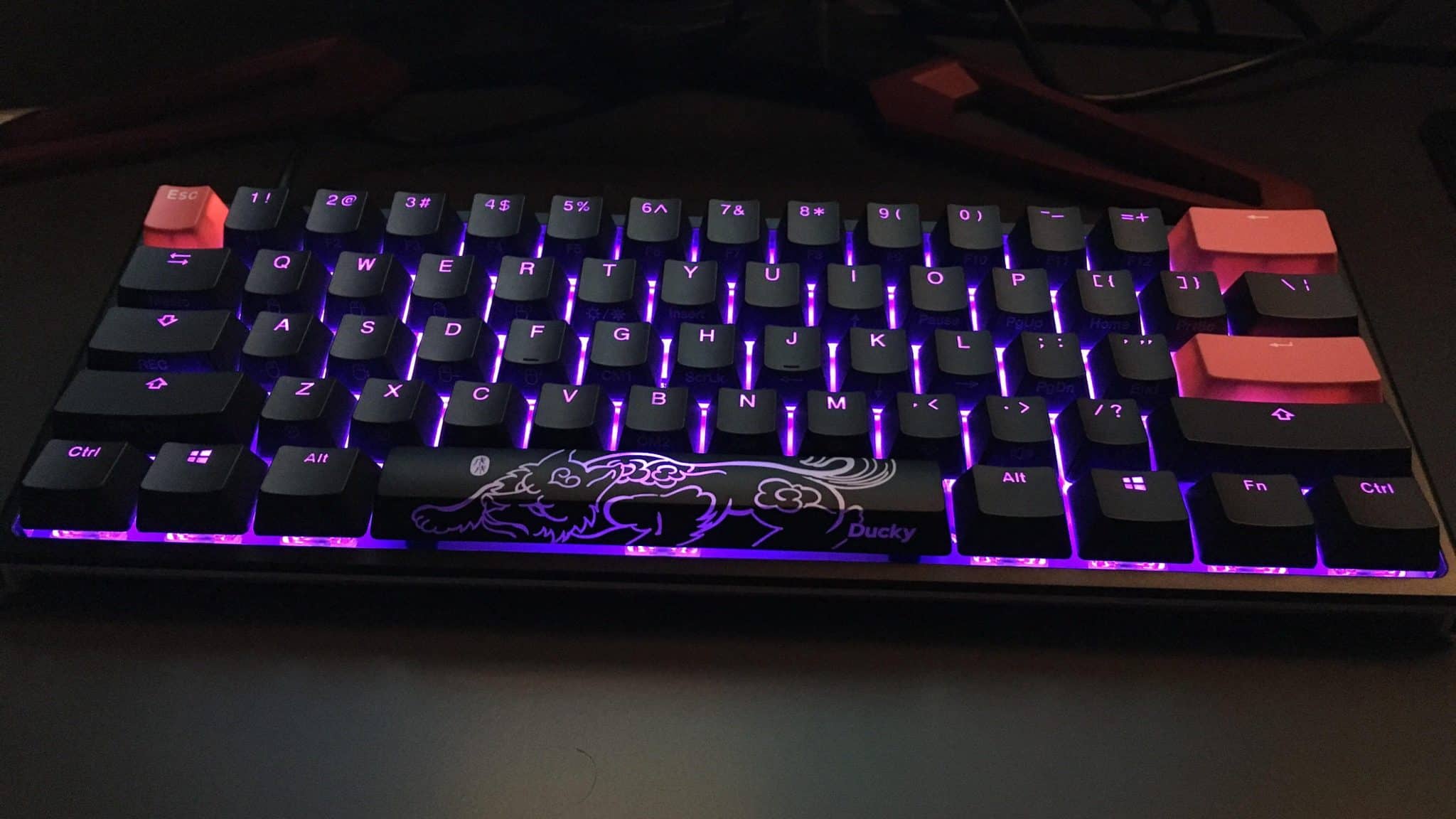
This is one of the most classic 60% keyboards you can find. It’s been around for a while before bigger brands started manufacturing their own and was always a solid pick. Before we jump into it though, there are newer versions like Ducky One 3 Mini and Ducky Mecha Mini, both of which are good and improved versions, but we’ve seen issues with availability on sites like Amazon and decided to list the classic Ducky One 2 Mini. If you see one of the others available, definitely consider them as well.
Back to the keyboard at hand, the Ducky One 2 Mini is a high-quality keyboard that comes in a cool black-and-white design. But there is also a fully white variant if that’s more your style.
The keys themselves are made of good PBT material and you will even get a set of 10 keycaps of random color and a lunar year themed spacebar to spice up your keyboard. However, the spacing between them does seem a bit higher which may make this keyboard a bit worse for gaming with smaller hands.
The switches are not hot-swappable, but you have a whole range of different options to choose from: Cherry MX Black, Red, Blue, and Silent Red. Gateron Brown and Red. Kailh BOX Brown, Red, Silent Pink, Thick Jade, White, Speed Copper, Speed Pro Burgundy.
Finally, there is no software to set up your keyboard. Everything is done using the keyboard itself. There are different presets and RGB effects like you would have in any other keyboard, just set up is done on the board. For some, it may be better, but for others not, so consider this when choosing this keyboard.
