

No Man’s Sky is a game that can sometimes randomly crash and risk you losing your progress, which is why you must know how to save your progress yourself. There are two types of saving in No Man’s Sky – autosave and restore point (manual save) and both can come in handy.
No matter which one you use, if you play in multiplayer, saving will not save your position in the world. All the structures and items in your inventory will be saved but you may spawn in a completely different place (usually in your ship space) whenever you launch the game next time.
Autosave
No Man’s Sky does have an autosave and it saves your game almost all the time. It is unclear how exactly the autosave works but every few minutes the autosave will update. That also means that your progress can be saved at an uncomfortable moment like when you are falling down a cliff.
Restore Point
Restore Point is a manual save in No Man’s Sky. It can be triggered by a secondary action like exiting your starship, using a save point, or using a save beacon. Each time you will see a prompt on your screen that the game is saved.
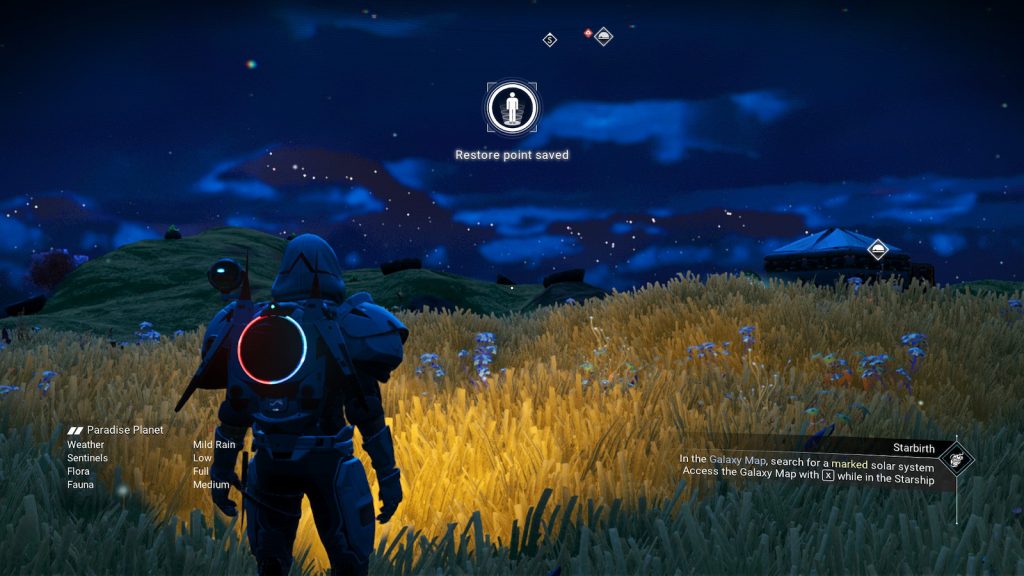
Exiting your starship is by far the easiest and most common way to save in No Man’s Sky. Simply enter and exit your starship to trigger the save.
A save point is a structure you can build in the “Deployable Technology” category of the build menu. Unlike most structures, you don’t have to be within your base to place it. That means you can use it to save anywhere anytime.
A save beacon is similar to the save point. You can find beacons either as white poles at different POIs or build one yourself. The difference from the save point is that the beacon will also scan for nearby structures on your screen when used for the first time.
Restoring the Save
You can reload either the latest restore point or the latest autosave. This is why we recommend occasionally saving manually, especially if you are away from your starship for too long. It will minimize your chances of losing a significant amount of progress.
To restore your save in No Man’s Sky:
- Press “Esc”
- Go to the “Options tab”
- Select “Reload Autosave” or “Reload Restore Point”

Pay attention to the time displayed on a save. This will help you understand whether it is the save you need or not. You can also choose to rename a save file. We recommend doing that before you set off to do something dangerous or time-consuming like hunting for an S-Class freighter.
