

Escape from Tarkov has long been the king of dangerous, unknown, and exciting gameplay. It can be quite tough to learn, especially on your own. But, if you play with your friends, you can learn the game much quicker. In this guide, we’ll talk about how to play Escape From Tarkov with friends.
How to Add Friends on Escape From Tarkov
If you decided to step into the spooky streets of Tarkov with your friend, don’t worry, you can add her/him very quickly:
- Click the “Messenger” button at the bottom right of the main menu.
- A new window will open. Click the “Friends” button at the top right.
- Enter your friend’s username and search. If the information is correct, her/his name should appear on the list.
- Click the “Send friend request” button next to the name.
That’s it. Once your friend accepts the invitation, they’ll remain permanently on your friends list until you remove them. This way you’re ready to start the game together. All you have to do for this is to invite her/him to the game.

How to Play Escape From Tarkov With Friends
What you need to do to play Escape from Tarkov with your friend is very simple. Just make sure you choose the same things as your friend. Go back to the main menu and follow the steps below:
- Choose your character, map, and time phase. Your friend should choose the same settings as you.
- Select where you want to spawn on the map.
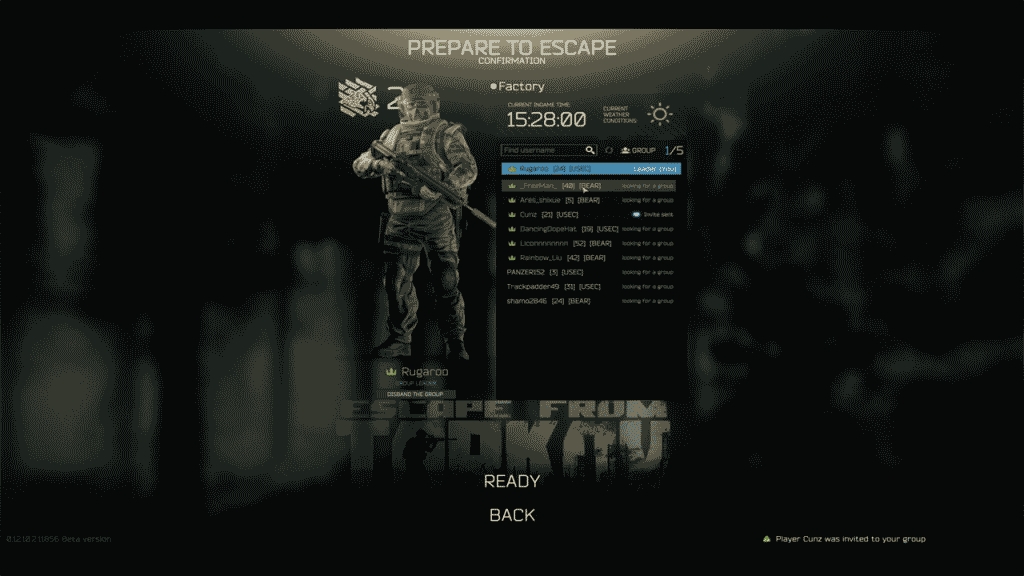
- Proceed until you reach the screen where you select your equipment. Here you will see the text “Prepare to Escape”.
- Complete your equipment selection and advance one last time. You will reach a screen where you will see a list of friends next to your character.
- Right-click on your friend’s username and invite him to your lobby.
- It means everything is ready as soon as you see each other’s characters. You can start your Tarkov adventure.
All these steps apply to both classic PMC and Scav classes. But on some maps, Scavs can spawn far apart from each other. So stick with PMC, at least until you know the game very well.
Now that you’ve learned how to play Escape from Tarkov with your friend, everything should be fine. However, let’s quickly answer a few questions that might come to mind, especially for new players.
How to Spawn With Friends in Escape From Tarkov?
If you follow the above steps correctly, you’ll spawn very close with your friend. You don’t need to make any special adjustments for this. Just make sure that you keep the pre-match information and the map start selection the same.
Can You Play Escape From Tarkov Offline With Friends?
Unfortunately, no. EFT has a complete online infrastructure and there’s no way to defeat this system. If you want to play with your friend, everyone must be connected to the Internet. Offline modes may come in the future, but the fun with friends will probably always remain on the online side.
Is Escape From Tarkov on Steam?
Nope. Isn’t that surprising? Escape from Tarkov uses its own infrastructure and servers. Therefore, it doesn’t use Steam, Epic Games, or any other online service. You can buy and download Escape from Tarkov only from the official website.
To play the game, download Beattlestate Games Launcher from the official site. Then enter your user information and open the game directly. That’s it!
Among your friends, there should be at least one of you who knows enough about the game to guide the other. Here are a few key things for you to know before jumping into Tarkov:
How to Rotate Items in Escape From Tarkov | How to Level Up Traders in Escape From Tarkov
